✦ Open Source · Tauri v2, Rust, Nuxt 4 & Vue 3 · v0.9.0-beta.1

Dual-Pane SFTP & SSH Terminal, Reimagined.

FlowSFTP combines a blazing-fast dual-pane local & remote file manager with a tabbed WebGL SSH terminal, built-in code editor with Vim mode, Spacebar Quick Look preview, external editor live sync, folder pairing, and kernel-speed remote SSH grep.

Download Free → Explore Screenshots GitHub
Windows & Linux (WSL Ready)
SFTP, FTP, FTPS & WebGL SSH
100% Free & Open Source (MIT)

See FlowSFTP in Action

Designed for server administration, remote development, and 10-worker concurrent file transfers with Catppuccin & Developer Classic themes.
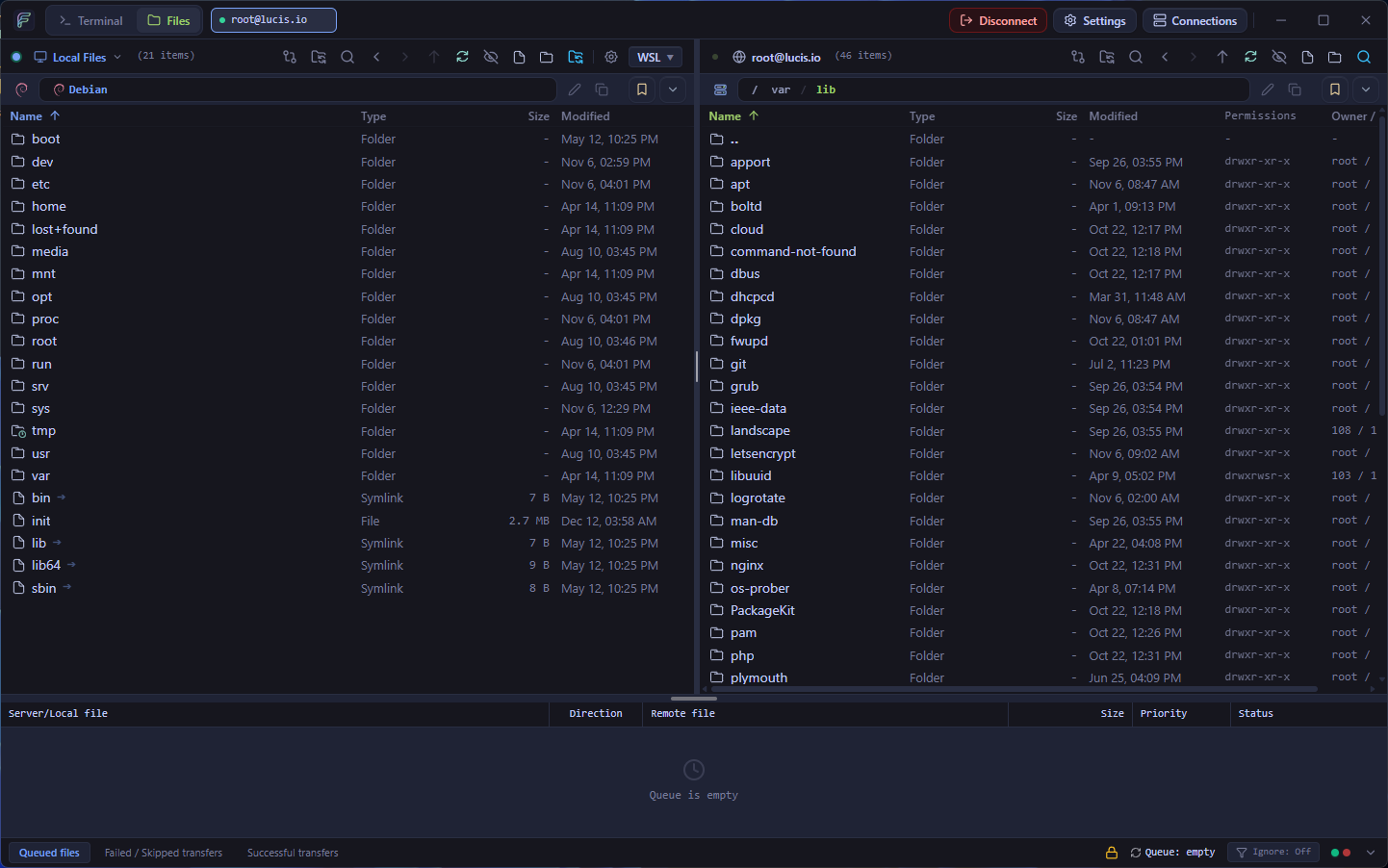
Dual-Pane Local & Remote SFTP File Manager SFTP

Dual-Pane Local & Remote SFTP File Manager

Side-by-side local and remote filesystem browsers with full-window resizable splitters, WSL distro auto-detection, Git status badges, and a FileZilla-exact 3-tab transfer queue.
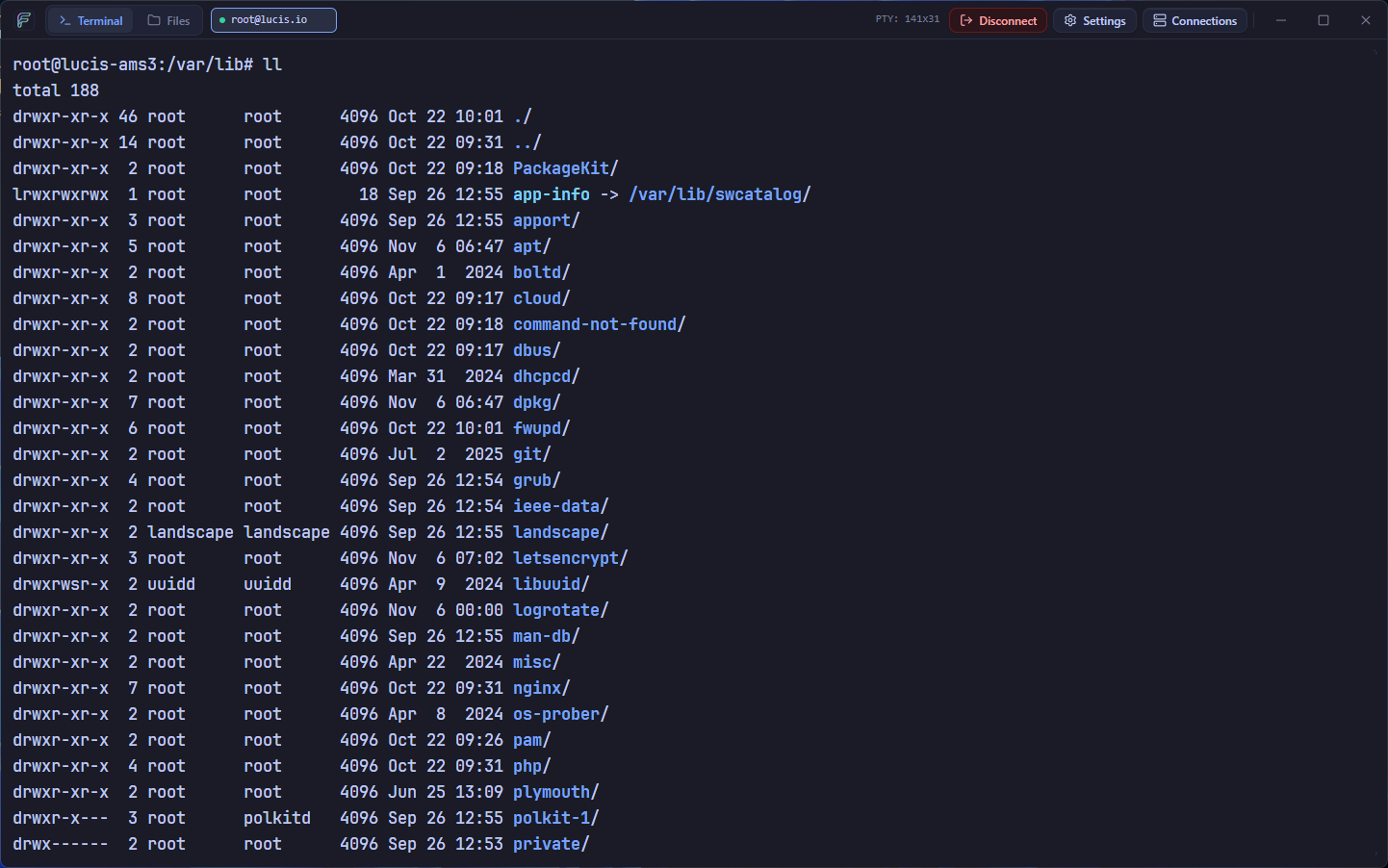
Hardware-Accelerated WebGL SSH Terminal TERMINAL

Hardware-Accelerated WebGL SSH Terminal

Multi-session tabbed xterm.js terminal powered by WebGL with one-click "Open in Terminal" directory jumping and auto-fit window resizing.
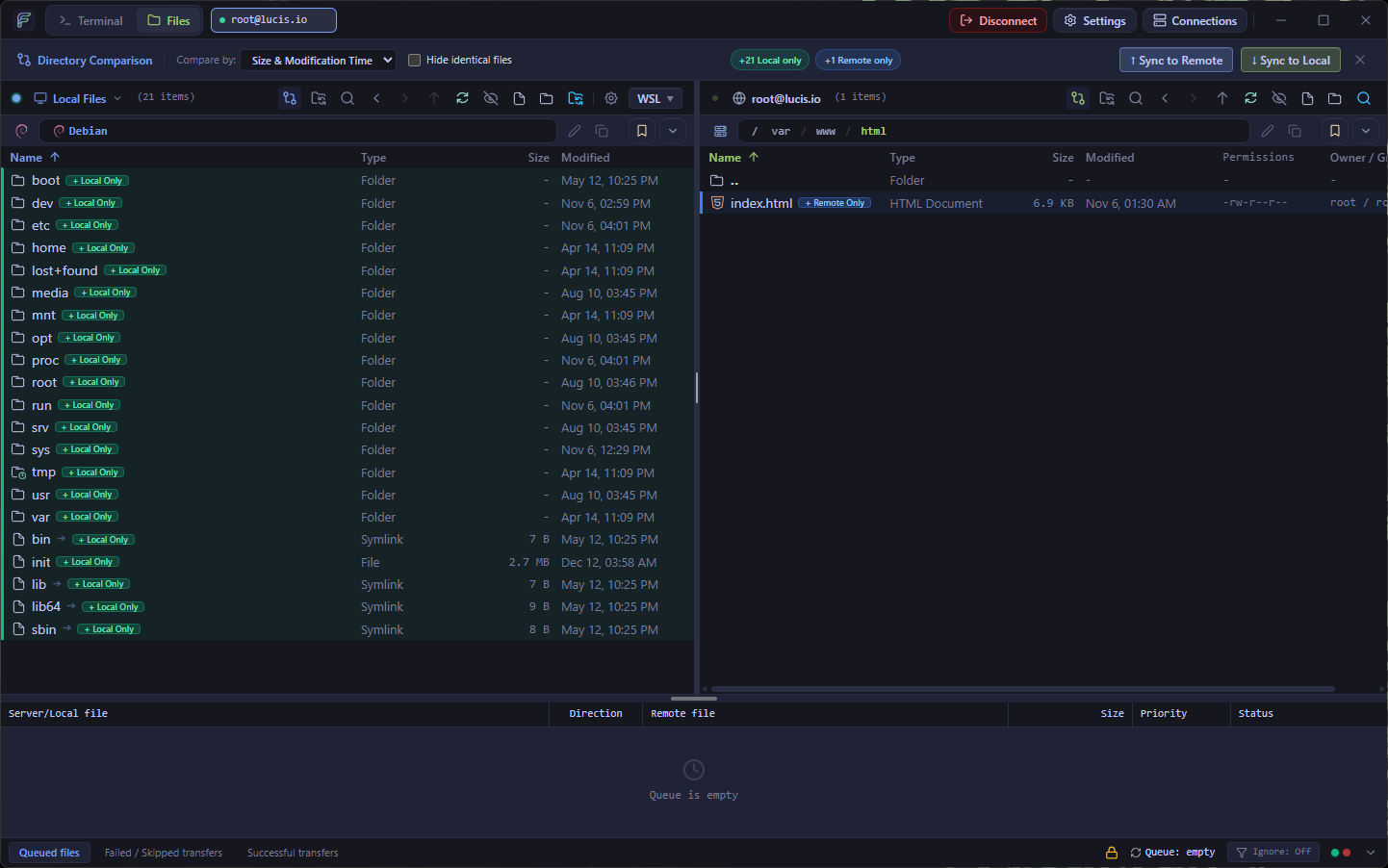
Live Directory Watcher, Folder Pairing & External Editor Sync SYNC

Live Directory Watcher, Folder Pairing & External Editor Sync

Bind local project workspaces to remote deployment paths with intelligent .git/node_modules ignore filters, visual directory comparison (Ctrl+Shift+C), and debounced auto-uploads on save.
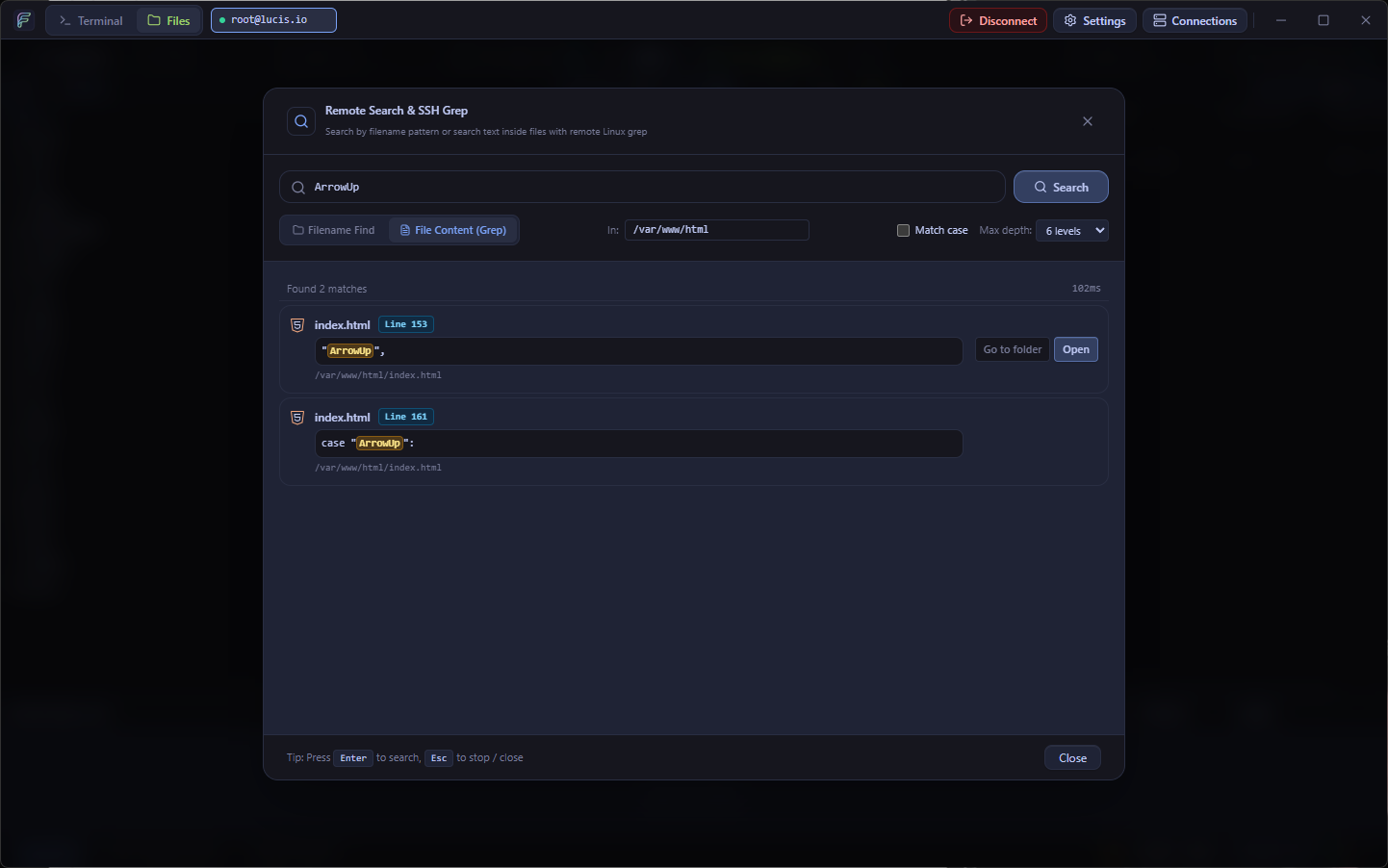
Kernel-Speed SSH Remote Grep, Built-In Code Editor & Quick Look TOOLS

Kernel-Speed SSH Remote Grep, Built-In Code Editor & Quick Look

Search remote directory trees via native SSH grep (Ctrl+Shift+F), preview files with Spacebar Quick Look, and edit code in-app with CodeMirror 6 and Vim keybindings.
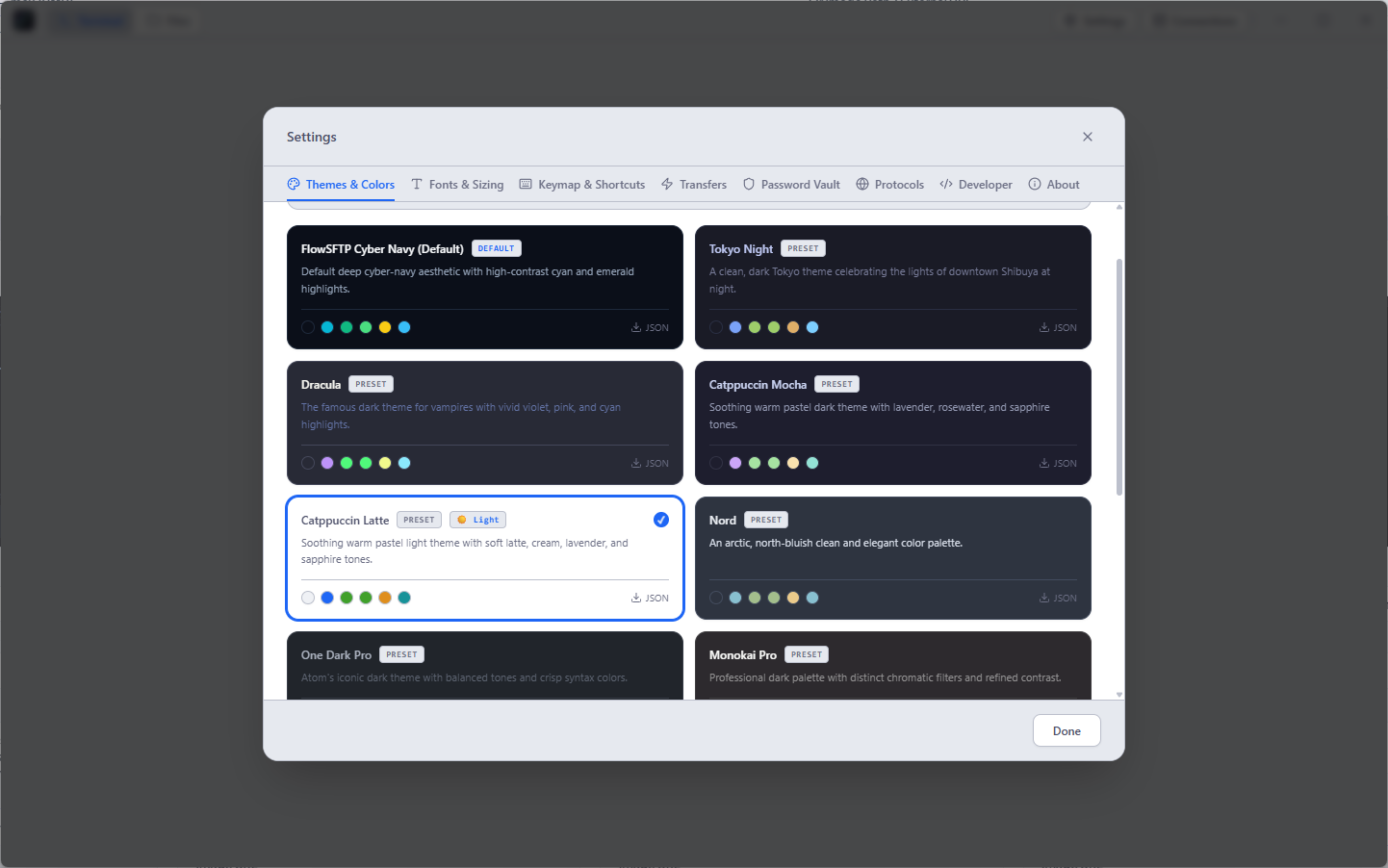
Multiple Themes & UI Customization THEMES

Multiple Themes & UI Customization

Switch seamlessly between 10+ curated themes including Catppuccin (Mocha, Macchiato, Frappé, Latte), Tokyo Night, Dracula, Nord, One Dark, and GitHub Dark & Light.

Built for Modern Server Workflows

Everything you expect from FileZilla and WinSCP, supercharged with async Rust (russh, suppaftp, notify v8) and modern IDE ergonomics.

russh · suppaftp

Dual-Pane SFTP, FTP & FTPS Manager

Concurrent Local & Remote panes powered by Rust’s async russh, russh-sftp, and suppaftp crates. Features full-window resizable splitters (double-click to snap 50/50), quick bookmarks, and native OS drag-and-drop.

xterm.js · WebGL

Hardware-Accelerated WebGL SSH Terminal

Multi-session tabbed SSH terminal built on @xterm/xterm and @xterm/addon-webgl. Jump straight into any remote SFTP folder with one-click "Open in Terminal" and automatic row/column fit resizing.

CodeMirror 6 · Vim

Built-In Code Editor with Vim Mode

Edit remote and local files directly in-app across SFTP, FTP, and FTPS. Powered by CodeMirror 6 with syntax highlighting for 100+ languages, first-class Vim modal keybindings, and instant upload on save (Ctrl+S).

Spacebar · Quick Look

Quick Look Instant Preview (Spacebar)

Press Spacebar on any remote or local file for an instant Quick Look preview of Markdown, JSON, source code, and images — complete with seamless Left/Right arrow key navigation between files.

notify v8 · Live Sync

Live Folder Watcher & External Editor Sync

Pair local project workspaces with remote targets or open remote files in VS Code, Cursor AI, and Sublime Text. Rust’s async notify v8 watcher auto-uploads changes on save while ignoring .git, node_modules, and dist.

Ctrl+Shift+C · Lockstep

Directory Comparison & Lockstep Browsing

Toggle visual Directory Comparison (Ctrl+Shift+C) with color-coded diff badges (+ Local Only, + Remote Only, ▲ Newer, ≠ Size Diff), one-click "Sync to Remote/Local" batch actions, and synchronized lockstep navigation.

Ctrl+Shift+F · SSH Grep

Kernel-Speed SSH Grep & Remote Search

Execute native find and grep -rnI directly on remote Linux/Unix hosts (Ctrl+Shift+F) with glob wildcards, regex, syntax-highlighted matches, live cancellation, and automatic BFS crawler fallback for FTP/FTPS.

1–10 Workers · 3-Tab

FileZilla-Exact 3-Tab Queue & 10x Workers

Dedicated Queued, Failed, and Successful tabs with server grouping, 1–10 parallel workers, directory flattening, live ETA & speed, priority levels, and post-queue actions (completion chime, auto-disconnect, or close).

zip · tar.gz · 7z

Server-Side & Local Archive Operations

Right-click .zip, .tar.gz, .tgz, .tar.bz2, .tar.xz, or .7z archives on the remote server to extract in-place over SSH, or compress remote folders directly into .tar.gz / .zip without downloading first.

Async Delete · Ctrl+F

Non-Blocking Async Deletion & Live Filter

Delete massive folders like node_modules or vendor asynchronously in the background with a live progress card and one-click safe cancel, plus instant in-pane substring filtering (Ctrl+F) and visual Chmod calculator.

WSL · Git · AES Vault

WSL Distro Recognition, Git Badges & Vault

Auto-detects WSL distros (Ubuntu, Debian, Fedora, Arch, Alpine, Kali) with brand icons, shows Git status badges (M, U, S, D), and secures profiles with AES Master Password vault, OS Keyring, and native PuTTY .ppk (v2/v3) keys.

Catppuccin · 10+ Themes

Multiple Themes & UI Customization

Switch seamlessly between Catppuccin (Mocha, Latte) and developer classics (Tokyo Night, Dracula, Nord, One Dark, GitHub Dark & Light) with rich file icons, Compact/Normal/Relaxed row density, and customizable monospace fonts.

Built for Modern Server Workflows

See how FlowSFTP stacks up against legacy file transfer clients across architecture, terminal integration, and security.

Capability FlowSFTP FileZilla WinSCP Cyberduck
File Management, Editing & Terminal
Dual-Pane File Manager & 3-Tab Queue
Tabbed WebGL SSH Terminal Basic / PuTTY
Built-In Code Editor & Vim Mode Basic Editor
Quick Look Instant Preview Spacebar macOS Only
External Editor Auto-Upload Sync Manual Prompt
Live Folder Watcher & Auto-Sync
Directory Comparison Ctrl+Shift+C
Kernel-Speed SSH Grep Ctrl+Shift+F Extension
Remote Archive Extract & Compress Custom Cmd
Background Async Deletion
WSL Auto-Detection & Git Badges
Multiple Themes (Catppuccin, Dracula, Tokyo Night) Basic Dark/Light System Only
Security, Vault & Platform Support
AES Master Vault & Native OS Keyring
Native PuTTY .ppk & Ed25519 Keys
Cross-Platform (Windows & Linux) Windows Only No Linux GUI
100% Free & Open Source (MIT)

Download FlowSFTP v0.9.0-beta.1

Choose your platform below. 100% free and open-source under the MIT License.

macOS
FlowSFTP .dmg — Universal
macOS 12+ (Apple Silicon & Intel)  ·  v0.9.0-beta.1
dmg Coming soon

Looking for release notes or older versions? Browse releases →

System Requirements

FlowSFTP is built on Tauri v2 and Rust, leveraging your operating system's native webview and keyring instead of bundling Chromium.

Windows

Windows 10 (1809+) or Windows 11 (x64)

Uses Microsoft Edge WebView2 Runtime (pre-installed on Windows 10 & 11) and Windows Credential Manager for secure password storage.

Linux

Ubuntu 22.04+, Debian, Fedora, or Arch Linux (x64)

Available as .deb, .rpm, and universal .AppImage packages with Secret Service / GNOME Keyring / KWallet support.

Latest from the Blog

Deep dives into async Rust SFTP architecture, Tauri v2 performance, and remote server workflows.

View All Articles →

Frequently Asked Questions

Everything you need to know about FlowSFTP, protocols, security, and platform support.

Yes! FlowSFTP is 100% free and open-source software released under the permissive MIT License. There are no paid tiers, trial limits, telemetry, or bundled adware.

FlowSFTP supports SFTP (over SSH via Rust’s async russh & russh-sftp), FTP, and explicit FTPS (TLS/SSL via suppaftp with automatic dropped connection recovery), plus interactive SSH Shell sessions. You can authenticate with passwords, OpenSSH/RSA/Ed25519 private keys (with passphrases), and native PuTTY (.ppk v2 & v3) keys without external conversion.

FlowSFTP combines an AES-encrypted Master Password Vault for organizing server profiles into custom group folders with native OS Keyring integration (Windows Credential Manager and Linux Secret Service via the Rust keyring crate).

Both! FlowSFTP includes a built-in CodeMirror 6 editor with syntax highlighting for 100+ languages and an optional Vim keybinding mode, plus Quick Look instant preview (Spacebar). Prefer an external IDE? Open any remote file in VS Code, Cursor AI, Sublime Text, or Notepad++ with automatic debounced upload on save.

Live Directory Watcher pairs a local workspace with a remote folder using Rust’s notify (v8) watcher, automatically uploading changed files while ignoring .git, node_modules, dist, .nuxt, and target. You can also press Ctrl+Shift+C to compare local and remote folders side-by-side with color-coded diff badges and one-click batch sync.

FlowSFTP includes Catppuccin (Mocha, Macchiato, Frappé, Latte) and developer classics (Tokyo Night, Dracula, Nord, One Dark, GitHub Dark & Light), rich Catppuccin & Lucide file icons, Compact/Normal/Relaxed row density, and customizable monospace fonts.